In this blogpost I’m going to walk you through the gotcha’s and the things I wish I knew before I started to build a simple but secure AI app on Microsoft Foundry. Before we do that, I’ll show you the high level architecture of that app
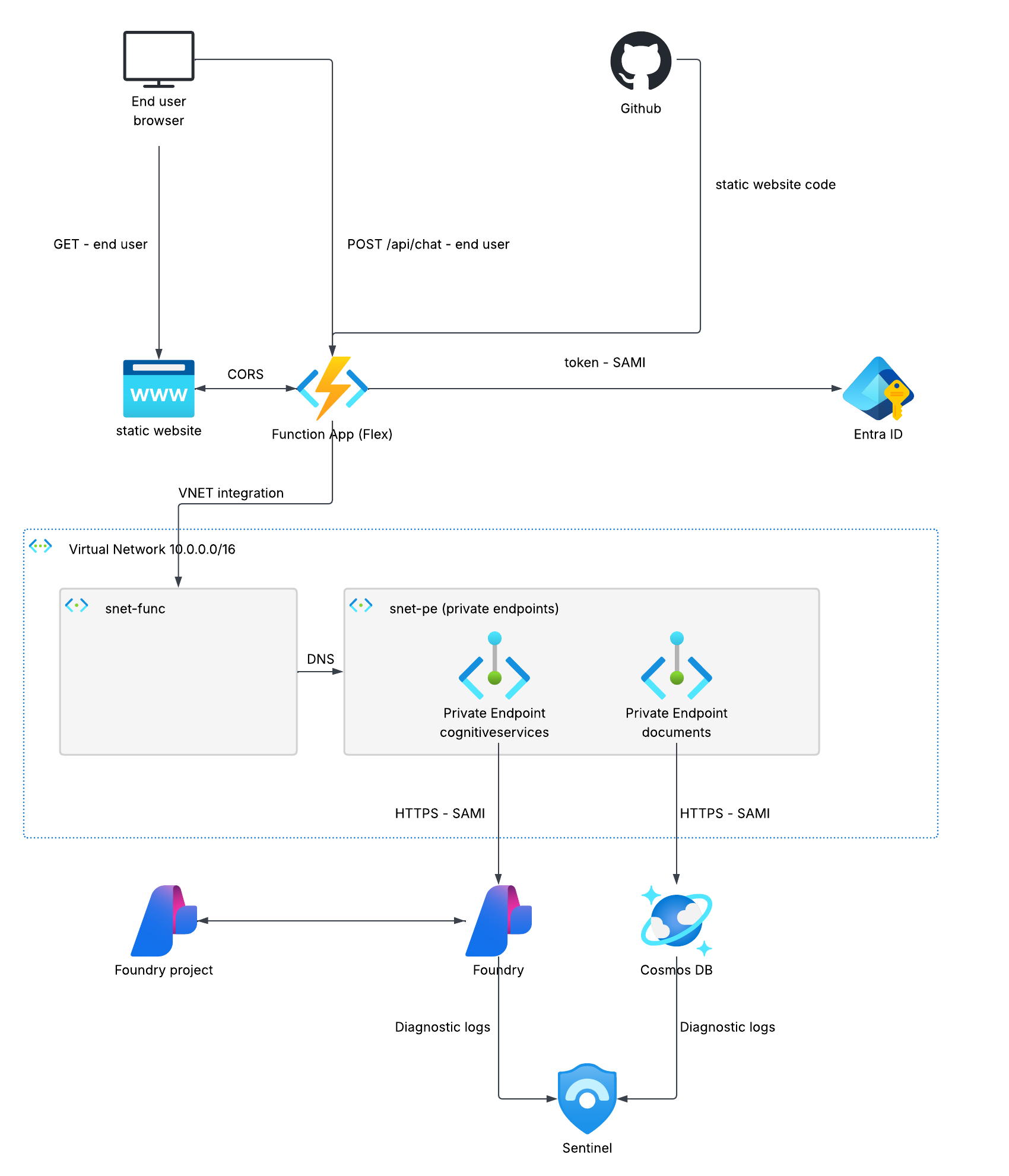
Nothing that broke this build was hard. Every single blocker was a one-line setting, a trailing slash, or a permissions boundary I forgot existed. Individually trivial; collectively, a day. This is the list I wish I’d had.
The theme: control-plane vs data-plane, and platform-in-front-of-your-code
If there’s one mental model that would have saved the most time, it’s this: being Owner/Contributor on a resource (control plane) does not grant you access to the data inside it (data plane), and it does not grant your app’s identity anything at all. Half the errors below are a version of that boundary. The other half are the platform returning an HTML error page where your code would have returned JSON — so the real error hides behind a misleading one.
Identity and RBAC gotchas
Two different identities, and it’s easy to fix the wrong one. There’s the CI/deployment identity (your pipeline authenticating to Azure) and the app’s runtime managed identity (the app authenticating to the model and database). They’re unrelated. Granting a role to one does nothing for the other. Name them explicitly in your head before assigning anything.
“Role assigned” ≠ “role on the identity that’s calling.” A 403 from the model service with the role assigned usually means the token came from a different identity than the one you granted. If a user-assigned identity is attached alongside the system-assigned one, the SDK’s default credential chain may grab the wrong one. Fix: keep it to a single system-assigned identity, or pin which identity the SDK uses via the client-ID app setting.
The right role name matters.** For model inference, the specific inference data role is required — not the similarly named, broader account role. The wrong one looks plausible and still 403s. Read the role description, not just the name.
RBAC propagation is real; network changes are fast. A fresh role assignment can take several minutes to work — a first-call 403 often isn’t a misconfiguration, just latency. Networking changes, by contrast, apply in a minute or two. Don’t conflate the two waits.
Database data access may not live in the IAM blade. Some services (the database here) use a data-plane role assigned via CLI, not the portal’s Access Control screen. If you only look in IAM, you’ll swear you assigned it — you didn’t.
CI / OIDC (GitHub Actions) gotchas
The portal’s “connect my repo” wizard can omit the subscription role. It creates the identity and federated credential correctly, then doesn’t grant it access at subscription/resource-group scope. Result: the CI login step gets a token, the CLI finds no subscriptions, and the job fails with a generic exit code. The fix is a role assignment, not anything in the workflow.
A federated-credential subject mismatch is the classic OIDC failure. The federated credential’s Subject must match the assertion your pipeline sends, character-for-character and case-sensitively. Watch for surprises like extra numeric IDs appended to the org/repo in the presented subject — the setup wizard builds the “clean” form and silently won’t match. Read the exact subject from the failed run’s log and mirror it.
App registration vs Enterprise application vs Managed identity. Only the App registration object exposes “Certificates & secrets / Federated credentials.” If you’re looking at an object with “Users and groups / Single sign-on / Provisioning,” you’re on the Enterprise application — the wrong twin. And some tenants provision a user-assigned managed identity instead, where the federated credential lives on the identity, not under App registrations. Confirm which object you actually have before hunting for a blade that doesn’t exist there.
CI secret values are masked in logs — including if you
echothem. Trying to print a secret to confirm it just yields***. (Also: the random suffix on an auto-generated CI secret’s name is not the secret’s value — don’t reformat it into a GUID and go searching; that’s a dead end.)Re-running the “connect my repo” wizard spawns duplicates. Every disconnect/reconnect can create a fresh identity, workflow file, and secret set. Old workflow files keep triggering on push and failing. Trim to one of each, or you’ll get intermittent phantom failures from stale pipelines — and orphaned identities that trust your repo.
Networking gotchas
Consumption-plan Function Apps can’t be IP-allowlisted the way you’d expect. Inbound access restrictions need a higher tier. And their outbound IPs are dynamic and shared, so allowlisting them on the model service is neither reliable nor secure. The correct isolation path is private endpoint + VNet integration (which needs a plan that supports outbound VNet integration), not IP rules.
Locking down the model service’s public access produces a 403 that looks like RBAC. Set it to “selected networks / public access disabled” with no route from the app, and you get a 403 even with a perfect role. A network 403 and an auth 403 are indistinguishable until you read the error detail — a virtual-network/firewall message vs a “principal does not have access” message. Turn on verbose error output before you assume it’s permissions.
Private endpoints live or die by Private DNS. The #1 way a private endpoint “makes it worse”: DNS still resolves the hostname to the public IP, which is now blocked. When creating the endpoint, let it create/link the Private DNS zone. With VNet integration, also point the app at Azure’s internal DNS resolver and enable the “route all outbound traffic through the VNet” setting — otherwise DNS and egress don’t actually traverse the VNet. Miss these and you get timeouts that look like everything else.
Keep a rollback lever. Flipping the service back to “all networks” instantly restores a working state while you debug DNS. Knowing this makes private networking safe to attempt rather than a potential dead end.
Frontend / wiring gotchas
“NetworkError” and “CORS failed” are often a 500/403 in disguise. When the backend errors before returning, the error response carries no CORS headers, so the browser relabels it as a CORS/network failure. A command-line request (which ignores CORS) shows you the real status and body. This one distinction ends most “CORS” debugging in seconds.
A “JSON parse error at line 1, column 1” means the body isn’t JSON. Either an empty body (a crash before your handler runs — e.g. a top-level import of a dependency that failed to install) or an HTML error page (403/404/405 from the platform). Fix by making the backend return JSON on every path and loading dependencies lazily inside the handler, so a load failure becomes a readable error instead of an empty 500.
“Could not resolve host” means a wrong or nonexistent hostname. Always copy the app’s exact default domain from its Overview page. The random suffix in the hostname is one typo away from an unresolvable name — and if the app genuinely doesn’t exist, no URL fix helps.
Uploading your site files is a data-plane action too. Owner on the subscription doesn’t automatically let you upload the site’s files to the static-website container. Either grant yourself the blob data role, or switch the storage browser’s auth method to access key. Same control-plane/data-plane boundary as everything else.
Logging
- Diagnostic settings are off by default. Even though you enable it for your resources does not mean that the prompts your app is recieving is captured.