Executive summary
Microsoft Foundry consolidates what used to be several separate services — Azure AI Studio, Azure AI Foundry, Azure OpenAI, Azure AI Services — into a single platform with one resource provider namespace, unified RBAC, networking, and policy. For security teams, that consolidation is mostly good news: fewer disconnected control surfaces, one place to reason about access.
But it also changes the shape of the risk. Five points for decision-makers:
- The resource model is now a blast-radius decision. A Foundry resource contains projects. How you draw those boundaries determines who can reach which models, data, and tools — and it’s difficult to redraw later.
- Agents are a new class of identity, not just a new feature. An agent that calls tools and retrieves data acts with permissions. Treat it as a workload identity with a threat model, not as a prompt with extra steps.
- Keys still work by default. Foundry supports Entra-based auth end to end, but key auth remains available unless you explicitly disable it. A leaked key bypasses every RBAC control you carefully designed.
- The default content safety posture is a floor, not a ceiling. Content filters and prompt-injection shields exist, but the enforcement mode, the coverage of indirect (cross-domain) injection, and the blocklists are configuration choices.
- Governance tooling now exists at fleet scale. Foundry Control Plane, guardrail policies, Azure Policy, Defender, and Purview integrations mean “we have twelve agents and no idea what they do” is now a choice rather than a limitation.
The one-line version: the platform gives you strong primitives, but nearly all of them are opt-in. Security in Foundry is less about writing custom controls and more about deliberately turning on the ones that ship disabled.
Intro
Before we jump into more technical discussion, here is an example layout of the Microsoft Foundry element in a working AI enabled app:
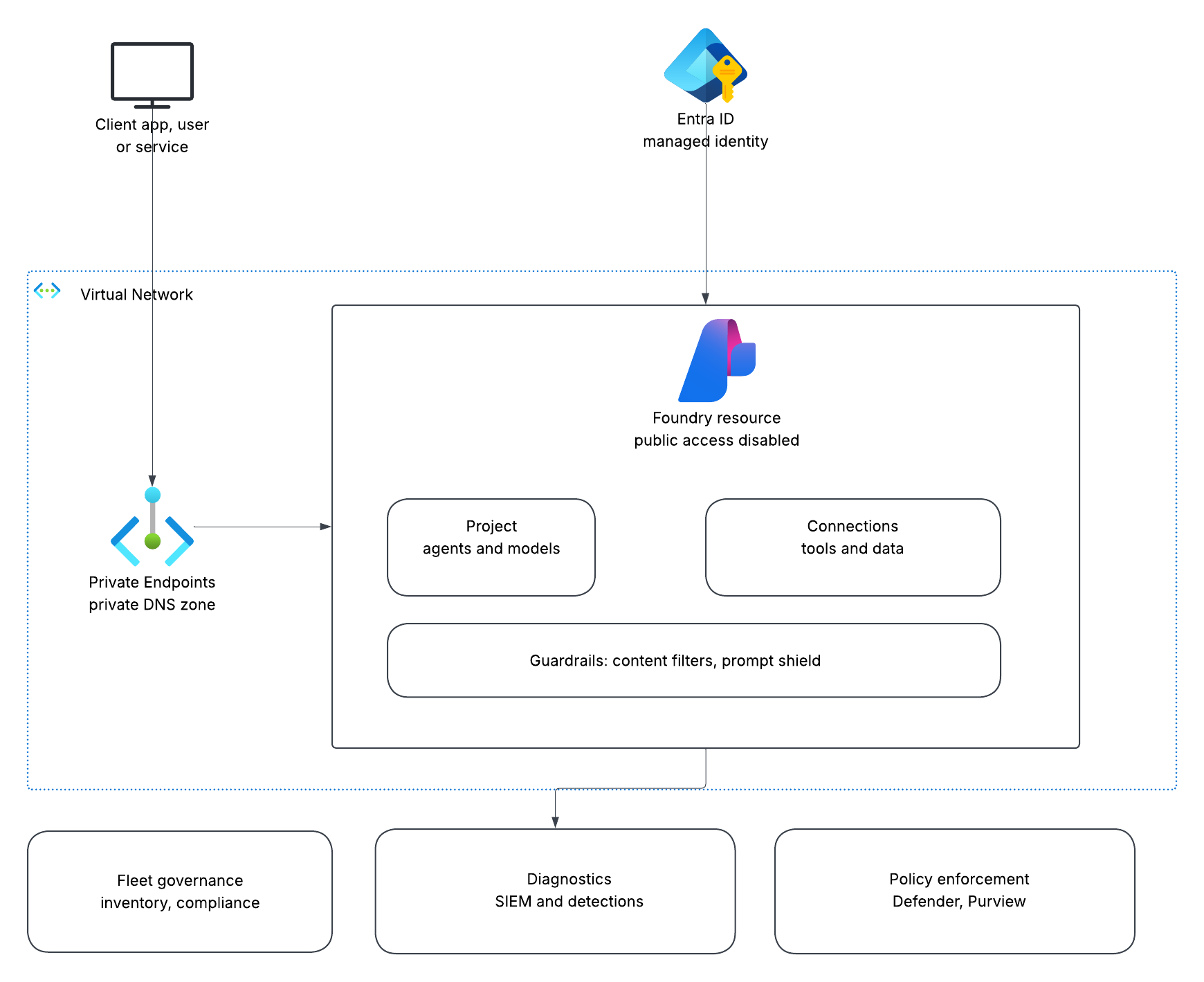
If you would like to take a look on how the architecture of a basic, secure-by-design AI enabled app looks like check my other post: https://gaborszekeres.com/blog/small-settings-that-cost-me-hours-deploying-a-secure-ai-app-on-microsoft-foundry/
In the opcoming sections we’ll focus on the security features of the specific infrastructure elements and the trade-off that can come with the compromise.
1. Resource and project topology: your first security decision
Foundry’s current model is a Foundry resource that contains projects, managed under a single Azure resource provider with unified access control, networking, and policy. (If you’re on hub-based projects, those live in the Foundry classic portal — new investment is in the new model, so factor migration into your roadmap.)
The decision: how many Foundry resources, and where do project boundaries fall?
| Approach | Advantages | Trade-offs |
|---|---|---|
| One resource, many projects | Simplest management; consistent policy and networking; unified quota view | Shared network posture and blast radius; noisy-neighbour quota contention; coarse isolation |
| Resource per environment (dev/test/prod) | Clean promotion path; prod can be locked down harder without slowing dev | More to manage; duplicated connection and policy configuration |
| Resource per business unit / data boundary | Strong isolation where data sensitivity or regulatory boundaries differ | Fragmented visibility unless you use Control Plane to aggregate; higher operational overhead |
My default recommendation: resource per environment, projects per team or use case within them. It gives you a hard boundary where it matters most (prod vs non-prod) without fragmenting into an unmanageable estate. Escalate to per-business-unit resources only when a genuine data-residency or regulatory boundary demands it.
Why it’s hard to undo: networking, policy, and connected resources attach at these boundaries. Re-parenting projects later means re-establishing connections, role assignments, and private endpoints. Spend the hour on the diagram before you provision.
2. Identity and access: make Entra the only path
The decision: key-based auth, Entra-based auth, or both?
Foundry supports managed identity and Entra tokens throughout. The trap is that key auth remains enabled by default, and if you upgraded an existing Azure OpenAI resource to a Foundry resource, your endpoint and API keys were deliberately preserved — convenient for migration, and a standing risk afterwards.
| Option | Advantages | Trade-offs |
|---|---|---|
| Keys only | Trivial to start; works from anywhere; no RBAC propagation delays | No per-caller attribution; keys leak into config, logs, notebooks; rotation is manual and disruptive |
| Entra + managed identity | Per-identity attribution, conditional access, no secrets at rest, revocation is instant | RBAC propagation lag; credential-chain ambiguity when multiple identities exist; harder local dev |
| Both (transitional) | Pragmatic during migration | The weakest path defines your security posture — keys undo the RBAC design |
Recommendation: go keyless and explicitly disable local (key) auth. Assigning the right role is not sufficient; as long as keys work, a leaked key is a full bypass.
Disabling keys is a property on the resource (disableLocalAuth), set at deployment or afterwards:
1Set-AzCognitiveServicesAccount -ResourceGroupName "my-resource-group" -Name "my-resource-name" -DisableLocalAuth $true
Azure Policy doesn’t flip that switch for you — it stops the setting from drifting and catches resources created without it. Use the built-in definition (“Configure Cognitive Services accounts to disable local authentication methods”) where one exists, or a custom rule:
 1{
 2  "mode": "Indexed",
 3  "policyRule": {
 4    "if": {
 5      "allOf": [
 6        { "field": "type", "equals": "Microsoft.CognitiveServices/accounts" },
 7        { "field": "Microsoft.CognitiveServices/accounts/disableLocalAuth", "notEquals": "true" }
 8      ]
 9    },
10    "then": { "effect": "[parameters('effect')]" }
11  },
12  "parameters": {
13    "effect": {
14      "type": "String",
15      "allowedValues": ["Audit", "Deny", "Disabled"],
16      "defaultValue": "Audit"
17    }
18  }
19}
Two practical notes. Start with Audit to see what a Deny would break, remediate the estate, then switch to Deny so nothing new slips through. And remember Deny is preventive, not retroactive — existing resources with keys enabled stay that way and simply report as non-compliant, which is exactly the upgraded-resource case in the gotchas below.
Least privilege in practice: grant the narrow, purpose-specific inference data role — not a broad account-level role that happens to work. The similarly-named roles are a genuine footgun: one grants management, the other grants inference, and the wrong choice fails in ways that look like a networking problem.
Agent identity is its own topic. As agents proliferate, governing which identity an agent runs as, and what that identity can reach, becomes an Entra administration discipline. Decide early whether agents run as a shared identity (simpler, poor attribution) or per-agent identities (better least privilege and forensics, more to manage). For anything touching sensitive data, per-agent identities are worth the overhead.
3. Network isolation: worth it, but only if DNS is right
The decision: public endpoint with identity-based access, service-firewall restrictions, or full private endpoint isolation?
| Option | Advantages | Trade-offs |
|---|---|---|
| Public endpoint + Entra auth | Simple; no DNS or VNet work; fine for many internal tools | Endpoint reachable from anywhere; identity is your only control layer |
| Service firewall (selected networks) | Cheap partial reduction of exposure | Serverless/consumption callers have dynamic, shared egress IPs — allowlisting them is fragile and weakly meaningful |
| Private endpoint + VNet integration | Traffic never traverses the public internet; defence in depth alongside RBAC | Requires a plan tier supporting outbound VNet integration; Private DNS complexity; per-endpoint cost |
Recommendation: private endpoints for production and anything touching sensitive data; identity-only is defensible for low-sensitivity internal workloads. Don’t bother with IP allowlisting for serverless compute — it creates the appearance of a control without the substance.
The gotcha that dominates this domain: private endpoints fail on DNS far more often than on networking. If the Private DNS zone isn’t created and linked to every VNet that resolves the name, clients still resolve the public IP — which you’ve now blocked — and you get timeouts that look like anything else. Link the zone, confirm outbound traffic actually routes through the VNet, and only then disable public access. Also note that AI service endpoints may resolve under more than one private-link zone depending on the SDK and hostname in use; link all applicable zones rather than assuming one.
Keep a rollback lever. Re-enabling public access restores service instantly while you debug DNS. Knowing that makes private networking safe to attempt.
4. AI-specific guardrails: the controls with no infrastructure equivalent
This is where AI workloads diverge from everything else in your estate. Traditional controls don’t address a model being talked into misbehaving.
Content filters and prompt shields. Foundry provides content filtering plus jailbreak and cross-domain prompt injection (XPIA) protections. The decision is enforcement mode:
| Mode | Use when | Trade-off |
|---|---|---|
| Annotate only | Red-team labs, tuning thresholds, measuring false positives before enforcing | Detects without stopping — not a production posture |
| Block | Production, anything user-facing | Requires threshold tuning; over-blocking generates support load |
Recommendation: block in production; use annotate-only deliberately and temporarily while you baseline. Add domain-specific blocklists — the built-in categories don’t know your business’s sensitive terms.
Indirect (cross-domain) prompt injection deserves specific attention. Direct jailbreaks in a user’s prompt are the well-known case. The higher-severity risk in agentic systems is injected instructions arriving through retrieved content — a document, a web page, a ticket body. Your architecture should treat all retrieved and user-supplied content as untrusted data, never as instructions, and your system prompts should say so explicitly. Guardrails help; architecture helps more.
Guardrail policies at fleet scale. Foundry supports defining guardrail policies centrally and applying them across deployments, with bulk remediation for non-compliant assets. If you have more than a handful of agents, per-deployment configuration will drift — policy-based enforcement is the answer.
5. Agents: new capability, new attack surface
Foundry offers prompt agents (declarative, platform-hosted) and hosted agents (your code and container, run by the platform with a managed endpoint, identity, scaling, and observability).
| Approach | Advantages | Trade-offs |
|---|---|---|
| Prompt agents | Minimal surface to maintain; no container or app code; platform handles hosting and identity | Less control over request handling, logging detail, and custom validation |
| Hosted agents | Full control over logic, framework, and custom controls; still get managed identity and observability | You own the code’s security: dependencies, output handling, error surfaces |
Security-relevant recommendation: prefer the declarative option unless you need custom logic — less code is less attack surface, and platform-managed identity and observability come free. When you do bring code, the classic application risks return: insecure output handling, verbose errors leaking internals, and dependency supply chain.
Tools are the privilege boundary. An agent’s risk is dominated by what its tools can do, not what the model can say. Every tool attached to an agent extends its effective permissions. Enumerate them, scope their credentials narrowly, and be especially careful with tools that write, send, or execute. The combination of “reads untrusted content” plus “can take consequential action” is the agentic equivalent of a confused deputy — and it’s the scenario worth threat-modelling first.
6. Quota and cost as a security control
Cost controls are usually filed under FinOps. In AI workloads they’re also a denial-of-service and abuse control.
Recommendation: set per-deployment token/throughput limits as a matter of course. It’s the cheapest available control against runaway loops, prompt-flood abuse, and cost-DoS, and it throttles at the source regardless of what sits in front. Pair it with token-usage and cost-anomaly monitoring — an unexplained consumption spike is a security signal, not just a billing one.
An AI gateway in front of your deployments adds centralised rate limiting, routing, and governance. Worth it once you have multiple consumers or need per-consumer quotas; overkill for a single internal app.
7. Observability, evaluation, and detection
Diagnostic logging is off by default on nearly everything. Enable it per resource, and send it somewhere your SOC actually queries. This is the single most common gap: excellent detection rules written against telemetry that was never being collected.
Design decision — what do you log? Metadata (who called, when, token counts, filter verdicts) is low-risk and usually sufficient for abuse and anomaly detection. Prompt and completion content enables far richer detections — injection pattern matching, data-exfiltration attempts, system-prompt extraction — but means you’re now storing conversation data, with the privacy, retention, and regulatory obligations that follow. Decide deliberately, mask what you can, and set retention and TTL explicitly.
Also worth knowing: platform-side abuse monitoring may retain prompts and completions for a period unless your organisation is approved for opt-out. Understand this before routing sensitive data through, because it isn’t visible in the portal.
Continuous evaluation is a security tool, not just a quality one. Foundry’s evaluators cover risk dimensions including sensitive data leakage and exposure to jailbreak and XPIA attacks, alongside quality measures like groundedness and tool-call success. Running these continuously turns “did our guardrails regress?” from an unknown into a monitored metric.
Automate adversarial testing. Treat guardrails the way you treat code: regression-test them. Automated adversarial probing — scheduled, with drift monitoring between runs — catches the case where a prompt change, a model version upgrade, or a config edit silently weakens protections that passed last month. Foundry provides tooling for automated vulnerability probing and scheduled scans; open-source frameworks cover the same ground if you’d rather assemble your own harness. The important part is that it runs on a schedule and alerts on regression, not that any particular tool does it.
Detection pipeline recommendation: flow diagnostics and Defender/Purview signals into your SIEM, then build detections for content-filter block spikes per caller, authentication anomalies, token-consumption outliers, and jailbreak/XPIA flags. Map them to MITRE ATLAS so AI-specific incidents triage alongside the rest of your estate. Also ingest the platform activity log — control-plane changes like new role assignments, network-rule edits, and key regenerations are exactly what an attacker touches, and it’s inexpensive telemetry.
8. Governance at fleet scale
Once you pass a handful of agents, per-project management stops working. Foundry Control Plane provides cross-project inventory, compliance posture, and integrated Defender and Purview signals in one interface, along with quota and gateway configuration.
Recommendation: stand up fleet-level visibility before you need it. The failure mode is predictable — teams ship agents independently, and twelve months later nobody can answer “how many agents do we run, what data do they touch, and which are non-compliant?” Inventory is the foundation of every other control.
Complement it with Azure Policy for preventive enforcement (deny key auth, require private endpoints, enforce diagnostic settings) — detective controls tell you about drift, preventive controls stop it.
Closing thought
The security primitives in Foundry are genuinely good, and the fleet-level governance tooling is well ahead of where this space was a year ago. The risk isn’t that the platform lacks controls — it’s that most of them are opt-in, several are easy to skip during a working-code-first build, and a few (key auth on upgraded resources, annotate-only guardrails, unlogged resources) fail silently in the direction of less security.
Treat the defaults as a starting point rather than a posture. Decide each control deliberately, write down the trade-off you accepted, and enforce it with policy so it doesn’t drift back.